
A familiar security check is being turned against users
CAPTCHA challenges are meant to help websites distinguish people from automated traffic. They are common enough that most internet users treat them as a routine interruption: identify objects in a picture, type a distorted string, or tick a box. A growing scam known as ClickFix exploits that familiarity by presenting a convincing-looking verification screen and then asking the visitor to carry out a sequence of keyboard actions.
The danger is not the visual challenge itself. The prompt instructs a person to press keys such as Windows+R, paste text with Ctrl+V, and press Enter. Those steps can open the Windows Run dialog and execute material that the fraudulent page has placed on the clipboard. In effect, the victim is manipulated into running the attacker’s command locally.
The Guardian reports that Chris Fistonich, a researcher at cybersecurity company Malwarebytes, described ClickFix as a sophisticated and extensively exploited malware-delivery campaign. Its effectiveness comes from social engineering rather than from an obvious technical exploit: the criminal needs the user to trust the page and follow instructions that appear to be part of a normal security check.
Why the scam can look credible
ClickFix pages imitate the language and layout of legitimate verification services. They may say that a page failed to display correctly or ask the visitor to confirm they are human. The request to tick a box can make the next instructions seem like an ordinary follow-up step.
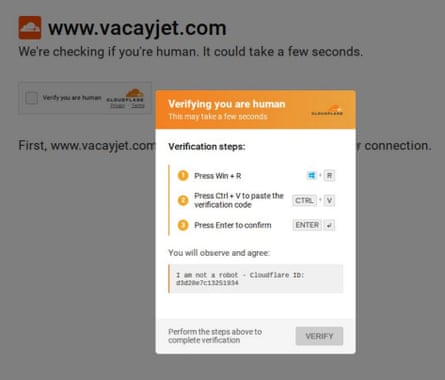
That familiarity is the central problem. A user who would be suspicious of a downloaded file or an unexpected browser warning may not immediately question a verification prompt. The scam takes advantage of a learned habit: CAPTCHA checks are usually inconvenient but harmless, so people are conditioned to complete them quickly.
The instructions reported in the article are especially risky because they do not ask the victim merely to click a link. They direct the person to paste clipboard contents into a system-level dialog. Once the pasted command is run, malicious software can be installed without the victim necessarily understanding what they have executed.

What users should treat as a red flag
A legitimate CAPTCHA may ask for a click, a visual selection, or a short text entry within the webpage. It should not require visitors to open a Windows dialog, use keyboard shortcuts to paste content, or run a command. Any “human verification” process that tells someone to press Windows+R, Ctrl+V, and Enter should be abandoned immediately.
- Do not follow CAPTCHA instructions that require system keyboard shortcuts.
- Do not paste text from a website into Run, Terminal, Command Prompt, PowerShell, or a browser developer console.
- Close the tab if a site claims that manually running a command will repair a display or access problem.
- Be particularly cautious when arriving at unfamiliar shopping, promotion, or small-business websites through ads or links.
The principle extends beyond this specific campaign. A website can ask for information through the browser, but it has no legitimate reason to make a visitor execute opaque text in an operating-system tool simply to view a page or prove they are human.
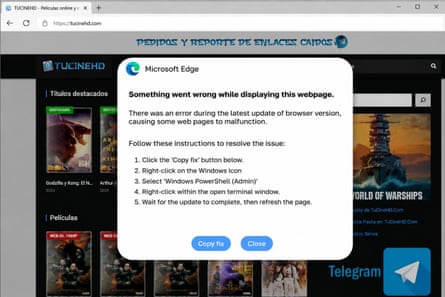
Security friction has become an attack surface
ClickFix reflects a broader shift in online fraud. Attackers increasingly use normal-looking interface elements, warnings, and support messages to make risky actions feel routine. Rather than defeating a device’s security controls directly, the scam seeks to persuade the person operating the device to bypass those controls on the attacker’s behalf.
That approach also makes the threat harder to recognize at a glance. The suspicious moment is not always a visibly malicious download. It may be a clean-looking box that borrows the language of bot protection and uses a familiar checkbox. The real test is whether the requested action makes sense for the task at hand.
For consumers and organizations, the practical response is clear: treat unexpected instructions to copy and run text as a security incident, not a troubleshooting step. Training and awareness should emphasize that browser-based verification never needs a user to open a system command interface. That simple distinction can stop this form of attack before malware has a chance to run.

A simple rule for verification prompts
When a page asks for proof that you are human, stay inside the page. If it asks you to open another application, use a system shortcut, or paste a hidden command, do not continue. Close the page and, if the site is one you intended to visit, reach it again through a trusted address or an independently verified search result.
This article is based on reporting by The Guardian. Read the original article.
Originally published on theguardian.com