Google is pushing AI deeper into the browser itself
Google is extending AI Mode in Chrome with a new side-by-side experience that keeps conversational search assistance visible while users browse the web. The update, announced April 16, is meant to reduce what Google describes as the constant “tab hopping” of modern web use, where people move between search results, source pages, and follow-up queries in separate browser contexts.
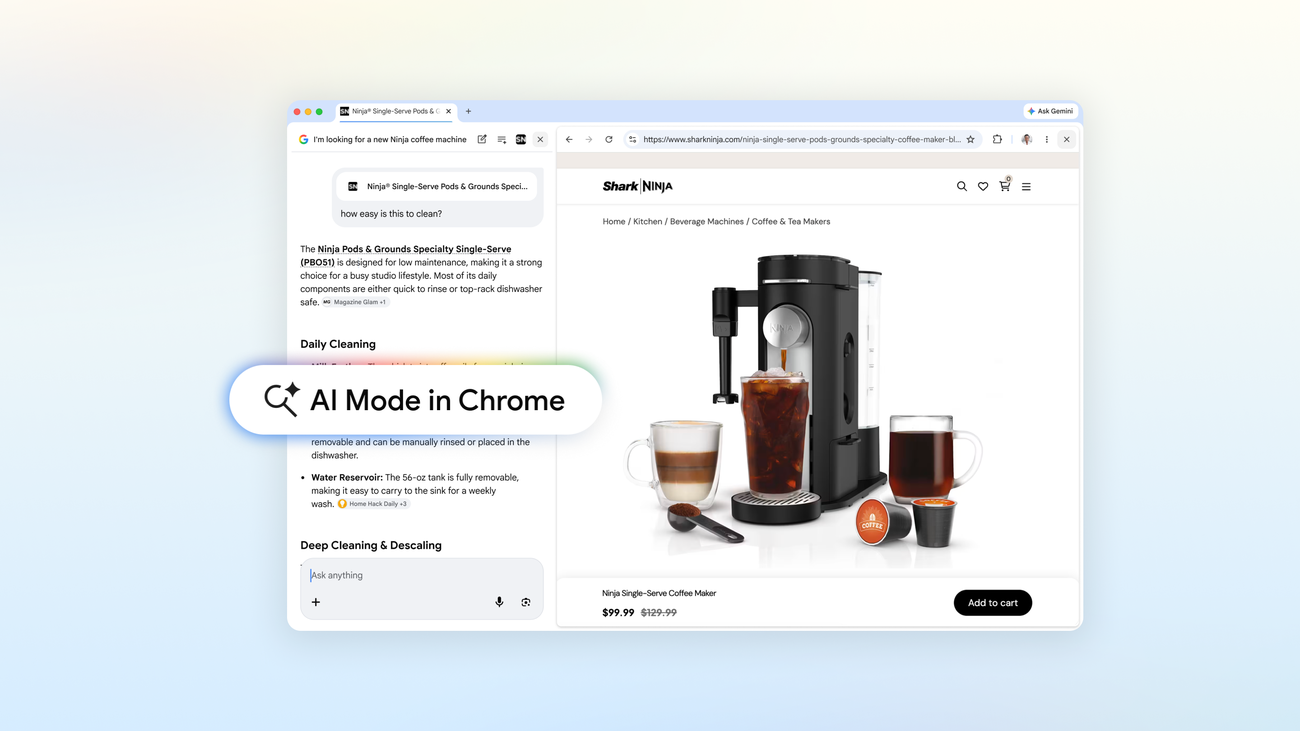
With the new setup on Chrome desktop, clicking a link while using AI Mode opens the webpage alongside the AI panel instead of replacing the search context. Google says that lets users compare information, ask follow-up questions, and stay oriented without repeatedly switching tabs. It is a product change with broader strategic significance: the company is trying to move AI assistance from a destination inside search toward a persistent layer across the browsing experience.
The update also includes the ability to search across recent Chrome tabs, further emphasizing that the browser itself is becoming a workspace for AI-mediated information retrieval rather than just a container for pages.
Why this matters beyond interface design
At first glance, this is a usability upgrade. But it also reflects a larger shift in how major tech platforms want users to interact with information online. Traditional search has long depended on a sequence: query, results page, click, back button, reformulated query, repeat. AI Mode instead tries to keep context alive across each step, making search feel more like an ongoing session than a chain of discrete page loads.
That matters because context persistence is one of the core advantages AI products are trying to claim over classic search navigation. If users can hold a conversation, inspect a page, and ask targeted questions without losing the thread, the browser becomes less fragmented and potentially more efficient for research, shopping, comparison, and learning.
Google’s examples in the source text show how it wants this to work. A shopper comparing coffee makers can open a retailer page next to AI Mode and ask practical follow-ups such as how easy a product is to clean. A fan researching McLaren Racing can browse the team’s site while continuing to ask contextual questions. In both cases, the model is not replacing the web page but sitting next to it as an interpretive layer.
The browser is becoming an AI surface
That positioning is important. For years, browsers competed on speed, extensions, security, and synchronization. Now they are becoming prime territory for AI assistance. By embedding AI Mode more directly into Chrome, Google is reinforcing the idea that browsing, reading, comparing, and searching should all happen inside a single augmented interface.
This raises the value of the browser as a strategic product. If AI can observe a user’s active page, recent tabs, and follow-up intent, it can offer more precise help than a detached chatbot working from scratch. The browser becomes not just a launch point for the web, but a context engine for AI.
The source text says early testers liked being able to get help with long articles or videos without constantly switching tabs. That feedback points to a concrete user problem: many online tasks now involve juggling too many partial contexts. Google’s answer is to keep the AI state anchored while the user moves through source material.
What changes for the open web
Google frames the new experience as a way to discover and learn from a wide range of perspectives across the web, and the side-by-side layout still sends users to original pages. That is a meaningful design choice. Rather than replacing links entirely, AI Mode in Chrome appears intended to coexist with them.
Still, the power balance may shift. When AI becomes the layer through which users interpret pages, compare claims, and decide what to read next, the browser mediates attention more actively. Publishers may still receive clicks, but users may increasingly arrive with summaries, extracted attributes, or pre-answered questions already in hand.
For users, that may be convenient. For the broader web ecosystem, it suggests a continued move toward AI-guided navigation in which discovery and comprehension are partly shaped by the browser platform itself.
Search across tabs is a subtle but important step
The ability to search across recent Chrome tabs may look like a secondary feature, but it reinforces the same strategic direction. Browsing sessions often sprawl across multiple sources, and the hardest part is not always finding information but recovering it. A browser that can help locate, summarize, and connect what the user has already opened becomes more useful as tasks get longer and more research-heavy.
That is especially relevant in a world where work increasingly happens across scattered documents, videos, product pages, and articles. Search across tabs turns browsing history into something closer to a working set that AI can help organize.
Google’s broader play
The source material supports a clear interpretation: Google wants AI Mode to feel native to Chrome, not detached from it. Side-by-side browsing preserves conversational context while visiting pages, and tab-aware search expands the browser’s role as an AI-assisted workspace.
The immediate benefit is less friction for users who are already moving between search and source material. The bigger implication is competitive. As AI assistants spread across operating systems, apps, and browsers, the winning products may be the ones that control context best. Google is betting Chrome can be that context layer for the web.
If that bet works, the browser will look less like a passive window into pages and more like an active research partner. AI Mode in Chrome is an incremental product release, but it points toward a larger redefinition of what browsing is supposed to feel like.
This article is based on reporting by Google AI Blog. Read the original article.
Originally published on blog.google