Adobe is shifting AI from generation to orchestration
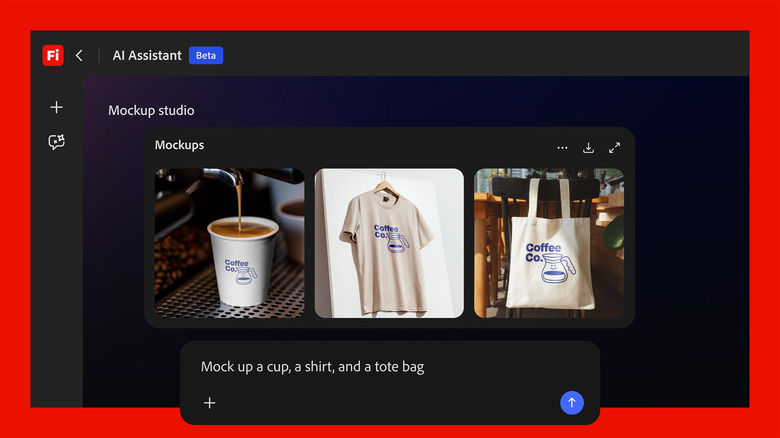
Adobe’s newest AI move is less about making another image generator and more about turning its creative software stack into a prompt-driven production system. The company says its new Firefly AI Assistant will work across Photoshop, Premiere, Lightroom, Illustrator and other apps, allowing users to describe an outcome and have the software perform the sequence of steps needed to get there.
That framing matters because Adobe is targeting a different bottleneck than most standalone generative AI tools. The problem is not only producing raw assets. It is navigating complex professional software to execute edits, format changes and workflow transitions that normally require experience with multiple menus, tools and file types. Adobe’s pitch is that users should be able to start with the result they want rather than the procedure needed to achieve it.
In Adobe’s telling, complexity itself has become a barrier. Applications like Photoshop are powerful precisely because they offer many paths and controls, but that depth can be intimidating for less experienced users or simply time-consuming for professionals working against deadlines. A layer that translates intent into action gives Adobe a way to make those tools more accessible without abandoning their existing capabilities.
What Firefly AI Assistant is supposed to do
According to the source material, Firefly AI Assistant acts much like a conversational AI system, but with Adobe’s creative applications behind it. A user provides a prompt describing the desired outcome, and the assistant can execute what Adobe calls complex multi-step workflows across its app ecosystem.
Adobe says the user remains involved during the process rather than handing the job over entirely. The company’s language emphasizes that creators can step in at any point to guide direction, adjust outputs and preserve authorship. That is an important distinction for Adobe, whose business depends on serving professional users that do not want to lose precision, editability or control in exchange for speed.
The company also says the assistant preserves Adobe’s native file formats, keeping the final work editable. That may sound procedural, but it is a serious competitive point. One of the weaknesses of many AI-first creative tools is that they generate useful output while disrupting the underlying working file. Adobe is trying to position Firefly not as a replacement for creative software, but as a faster interface to the software creators already use.

Creative Skills and context-aware decisions
Adobe is also introducing what it calls Creative Skills, which package multi-step workflows into promptable actions. In the example cited by the source, a user could start with a “social media assets” skill and then ask the system to crop material or use Generative Extend to fit formats for platforms such as Instagram or Facebook.
That points to the kind of work Adobe believes AI can absorb efficiently: not the entire creative process, but the repetitive or technically fiddly parts that sit between a concept and a deliverable. Resizing, extending, reformatting and coordinating assets across channels are exactly the kinds of tasks that consume time without necessarily adding creative value.
The source also describes context-aware decisions within a project. In one example, Adobe imagines a product photo set in a forest, where the assistant might provide a simple control to increase or reduce surrounding foliage. The significance here is not just generation. It is the attempt to translate high-level visual direction into interface elements that feel usable inside a professional workflow.
Why Adobe is making this move now
Adobe’s timing reflects a broader pressure on established software companies. Generative AI tools have made it easier for users to get quick results without learning traditional creative suites, raising the question of whether “software” itself is being compressed into chat-like interfaces. Adobe’s response is to argue that its advantage lies in the depth, precision and interoperability of its professional tools.
Firefly AI Assistant is therefore both product feature and defensive strategy. It is meant to make Adobe software easier to use while reinforcing the value of the underlying applications. Rather than concede that conversational AI will sit on top of generic models and make legacy creative tools feel heavy, Adobe wants to provide its own assistant grounded in its own ecosystem.
The company also claims the assistant will learn a user’s style over time. If that promise holds, Adobe could strengthen switching costs by making the software more personalized as well as more capable. For professionals and teams with established workflows, that could be more persuasive than one-off AI novelty features.

Team workflows matter too
The announcement is not limited to solo creation. Adobe says the assistant can help organize and share work among team members through Frame.io, connecting creation with review and collaboration. That is significant because enterprise creative work often fails not in asset generation but in handoffs, approvals and version control.
If Adobe can use AI to reduce those frictions, the company’s advantage becomes broader than feature parity with image-generation rivals. It starts to encompass the whole production environment, from ideation to edit to review to delivery. That is a more defensible space than the standalone prompt-to-image market.
What happens next
Adobe says Firefly AI Assistant will arrive in public beta in the coming weeks. That leaves open the most important questions: how reliable the cross-app orchestration will be, how transparent the system is about the edits it performs and how well it handles professional edge cases. Those details will decide whether the tool becomes a serious productivity layer or mainly a demonstration of intent.
Still, the announcement is meaningful because it captures where creative AI is heading. The next competition is not only about generating media. It is about coordinating software actions, compressing workflows and giving users a faster path from idea to finished asset without forcing them to abandon editability or control. Adobe’s new assistant is an early attempt to define that layer on its own terms.
This article is based on reporting by Engadget. Read the original article.

Originally published on engadget.com


