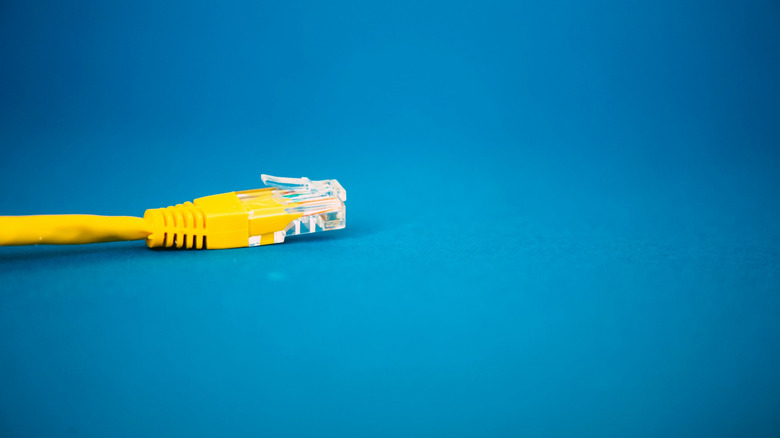
The humble Ethernet cable rarely gets a moment in the spotlight. It hides behind desks, vanishes into walls, and usually only comes up in conversation when a router misbehaves or a video call stutters. But as Engadget recently pointed out, that same unglamorous strand of copper can take on a second life — or several — once you pair it with the right add-ons.
That is welcome news for anyone with a drawer full of leftover patch cables salvaged from old routers, modems, printers and office equipment. The cable itself is a passive component: twisted pairs of copper terminated with a connector on each end. What changes its capabilities is whatever you attach to it.
Why Ethernet Still Earns Its Place
Wireless networking has improved enormously over the past decade, but wired links retain a few advantages that no access point can fully replicate. Copper Ethernet is a known quantity, and its behaviour is easy to reason about in a way that radio frequency coverage never quite is.
- Predictable throughput. A cable run either negotiates a link speed or it does not. There is no hunting for a better channel or watching signal bars drift.
- Low, consistent latency. For gaming, video conferencing and remote desktop work, a stable wired link avoids the jitter that plagues congested wireless bands.
- Resistance to interference. Twisted-pair construction and differential signalling cancel out much of the electrical noise that would otherwise corrupt a signal.
- Low cost and long life. Copper cabling is inexpensive, widely available, and typically outlasts the devices plugged into it by many years.
Those same properties — cheap, robust, well-understood — are exactly what make the cable such a good candidate for reuse. You are not limited to moving internet traffic from one room to another.
Add-Ons That Change What a Cable Can Do
The real transformation happens at the endpoints. A few inexpensive accessories turn a data-only connection into something considerably more flexible.
Power over Ethernet
Power over Ethernet, or PoE, carries both data and electrical power over the same cable. Injectors add power at the source end, while splitters separate the power back out at the destination. The technology is standardised across several power tiers, and modern versions can deliver enough wattage to run far more than a simple phone.
In practice, this means a single cable run can feed a security camera on the side of a house, an upstairs wireless access point, or a small single-board computer tucked into a cabinet — no separate power outlet required. That is a significant advantage in attics, garages and exterior walls where mains wiring is awkward or absent.
Adapters and Converters
Simple adapters extend the cable's reach to devices that were never designed for it. USB-to-Ethernet adapters let laptops and tablets without a built-in port join a wired network, and the reverse direction lets older peripherals connect to modern machines. Because the adapter handles the translation, the underlying cable remains just a transport medium.
Extenders and Baluns
Extenders and baluns repurpose the twisted pairs for entirely different signal types. HDMI over Ethernet, USB over Ethernet and even analogue audio over Ethernet all rely on the same principle: send a signal that would normally degrade over a short, expensive cable across cheap copper instead, then reconstruct it at the far end. For anyone trying to get a video feed from one side of a building to the other, this can be far cheaper than a long specialised cable.
Practical Second Lives for Spare Cables
Combining those accessories with a spare cable opens up a surprising range of projects:
- Home surveillance. A single PoE run powers and connects an outdoor camera without a nearby socket.
- Outbuilding links. Sheds, garages and garden offices often sit beyond reliable Wi-Fi range.
- Home lab wiring. Servers, network storage and test machines benefit from dedicated wired links.
- Retro and legacy hardware. Older consoles and computers can be brought onto a modern network through adapters.
- Sensor and control networks. Low-voltage devices can share a wiring backbone with data traffic.
- Long-distance video. Extenders carry a display signal much further than a standard cable allows.

What to Check Before You Repurpose a Cable
Not every spare cable is a good candidate, and a little inspection saves frustration later.
- Category and rating. Higher categories support faster link speeds. An older cable may work perfectly well, but it will cap your throughput.
- Solid versus stranded conductors. Solid-core cable is intended for permanent runs; stranded patch cable is more flexible but less suited to long in-wall routes.
- Shielding. Shielded cable helps in electrically noisy environments, though it must be terminated correctly to be useful.
- Distance limits. Copper Ethernet has well-known practical length limits, beyond which a link may fail to negotiate or behave unreliably.
- Power budget. If you plan to use PoE, confirm that the injector and the receiving device agree on the power tier.
- Never carry mains voltage. Low-voltage data and power is one thing; building wiring is another entirely and belongs to a qualified electrician.
The Bottom Line
Ethernet cable has a reputation problem: it is treated as infrastructure, not as a tool. Yet the same qualities that make it boring — durability, simplicity, ubiquity — make it an unusually versatile building block once you add the right components. A cable pulled from a retired router does not have to sit in a drawer. With an injector, an adapter or an extender, it can power a camera, bridge a distant outbuilding, or feed a screen across a house. The hardware world is full of single-purpose gadgets; the Ethernet cable is one of the few that quietly becomes something else when you ask it to.
This article is based on reporting by Engadget. Read the original article.

Originally published on engadget.com