The next smart home screen may already be in a drawer
Smart home hardware usually arrives in the language of newness: new speakers, new displays, new cameras, new hubs. But one of the most useful upgrades now gaining attention is built around something far less glamorous: the old tablet many households already own.
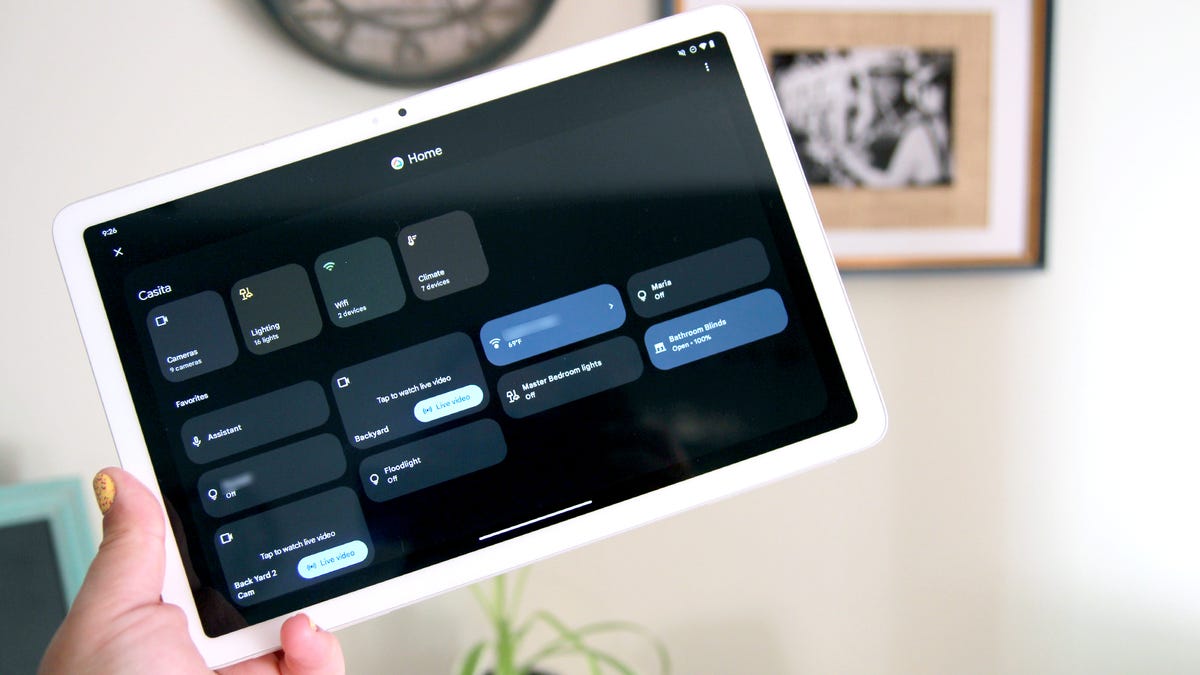
In a guide published by ZDNET, staff writer Maria Diaz argues that one of the best uses for an aging tablet is to turn it into a smart home control panel. The appeal is straightforward. Instead of letting an older iPad, Fire tablet, or Android device sit unused, homeowners can give it a fixed purpose as a shared screen for lights, plugs, switches, and other connected devices.
The idea is practical rather than futuristic, which is partly why it matters. For years, the smart home market has asked users to add more endpoints and more apps. That often produces convenience for the person who set everything up, but not always for everyone else in the house. A dedicated control panel changes that equation by putting a familiar touch interface in one place and making it available to anyone at home.
A central control point solves a common smart home problem
ZDNET frames the tablet-panel setup as both one of the easiest and one of the cheapest upgrades a user can make. The logic follows from the friction that builds up as connected devices multiply. Smart lights may be manageable from a phone. Add plugs, switches, routines, scenes, and multiple users, and the system can start to feel fragmented.
A central display creates a different kind of experience. Rather than hunting through personal devices or switching between apps, household members can walk to one spot and control what they need. That makes the smart home feel less like a collection of individual gadgets and more like a shared environment.
This is especially relevant in homes where automation has outpaced usability. The owner may know the app structure, voice commands, and routines by memory, but guests, children, and other family members often do not. A mounted or docked tablet acts as a low-friction fallback: visible, static, and legible.
ZDNET also notes that Diaz has repurposed old Fire tablets into Echo Show-like devices for home use, underscoring a broader point. Retired consumer hardware does not need to disappear from the home to justify its value. It can be absorbed into ambient computing, where the device matters less as a personal computer and more as part of the environment.

Reuse is becoming part of consumer tech’s value proposition
The article is not a sustainability manifesto, but the reuse angle is hard to miss. Consumer electronics often age out of daily use long before they become physically useless. Performance may no longer satisfy as a primary device, yet the hardware remains more than capable of handling fixed-purpose tasks such as home control.
That makes the old-tablet panel a small but revealing example of how the smart home is evolving. Instead of demanding a constant stream of dedicated new hardware, some of its most effective improvements can come from redeploying what users already own. In practical terms, that lowers the barrier to entry. In economic terms, it stretches device life. In behavioral terms, it can make the home’s digital layer more visible and easier to share.
There is also a design lesson here. Smart home systems often succeed or fail not because a device lacks features, but because it lacks a clear place in daily routine. A phone is powerful, but it is also personal and mobile. A fixed tablet panel is less powerful, yet often more usable for common household tasks because it is always there.
The dashboard is the point, not the tablet
What Diaz highlights is not just a clever hack. It reflects the growing importance of interface design in the smart home. As connected devices spread across the house, the value shifts from any single sensor or switch toward the dashboard that makes those systems coherent.
A dedicated panel helps consolidate that experience. It becomes the place where the home can be read and adjusted: lights on or off, switches toggled, devices checked, and routines managed from one screen. ZDNET’s description emphasizes exactly that benefit, describing the setup as a hub that anyone at home can access.
That shared-access model may prove more durable than voice-first control in many households. Voice assistants remain convenient, but they can be awkward in noisy rooms, unreliable for guests, or impractical when users want to see device status before acting. A wall-mounted or stand-based tablet offers visibility as well as control.
The setup also gives older hardware a stable operating role. Tablets that no longer need to carry the full burden of mobile productivity can still perform well when asked to display a dashboard and accept occasional input. In that sense, the repurposed tablet is less an outdated gadget than a perfectly matched appliance.

A modest upgrade with larger implications
There is no major product launch behind this shift and no new standard announced alongside it. That is part of what makes it interesting. Some of the most consequential changes in consumer technology happen quietly, when users repurpose existing tools into better habits.
ZDNET’s advice points to exactly that kind of transition. The smart home is maturing from a novelty of scattered devices into a practical layer of household infrastructure. When that happens, the winning interfaces are not always the newest or most expensive ones. Often they are the ones that remove friction, reduce clutter, and fit naturally into the home.
An old tablet turned into a control panel does all three. It extends the life of hardware that might otherwise be forgotten, creates a central point of access for connected devices, and makes the smart home easier to use for more than just the person who configured it. For a category often defined by complexity, that is a meaningful kind of progress.
The lesson is simple: the smartest upgrade in the room may not be buying another screen. It may be deciding what the unused one is for.
This article is based on reporting by ZDNET. Read the original article.
Originally published on zdnet.com


