Finding Documents Without a Tracker Tag
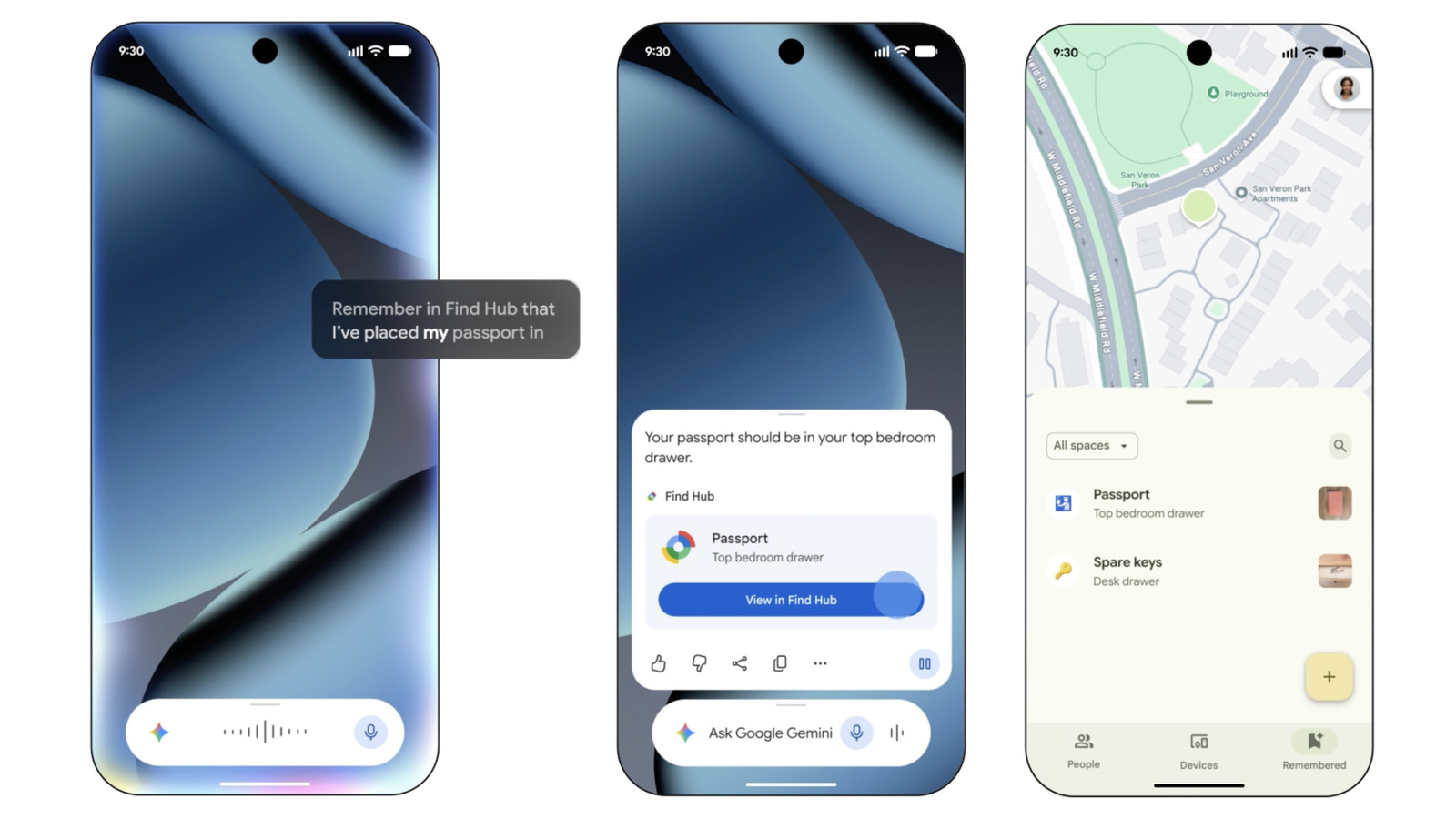
Misplacing a passport, a birth certificate, or a set of immigration papers is one of the more stressful failures of everyday organization. The usual fix has been to slip a small Bluetooth tracker into the folder or envelope that holds them. According to Engadget, there is now a different route: Google's Gemini assistant and the company's Find Hub service can be used together to keep track of important documents, and the approach does not require a compatible tag at all.
That single detail is what makes the tip worth paying attention to. Tracking accessories have become cheap and plentiful, but they still demand a purchase, a battery, and a physical place to live. Documents that sit in a drawer for months at a time are exactly the kind of item a user forgets to equip — and exactly the kind of item that is hardest to replace when it goes missing. Removing the tag from the equation lowers the barrier to entry to zero, at least in terms of hardware.
What Find Hub Brings to the Table
Find Hub is the umbrella name for Google's device-and-item locating service, the layer that already helps people track phones, earbuds, and other hardware tied to their account. The service is designed around a simple idea: when something registered to your account is nearby or connected, you should be able to see where it is and, in some cases, make it ring or display a message.
Historically, extending that reach to non-electronic objects meant buying a tag that could join the network and act as a stand-in beacon for the item it was attached to — a backpack, a suitcase, a set of keys. The Engadget report suggests that pairing Find Hub with Gemini opens a complementary path, one that leans on the assistant rather than on dedicated hardware.
In practical terms, this fits a pattern that has been building across the consumer technology industry for several years:
- Assistants are increasingly used as a natural-language front end for services that previously required navigating menus.
- Locating tools are broadening from single devices to whole categories of personal belongings.
- Hardware accessories are being positioned as optional add-ons rather than mandatory entry points.
Put together, those trends explain why a document-tracking workflow built on Gemini and Find Hub is plausible as a mainstream feature rather than a niche hack.
Why Skipping the Tag Matters
The most obvious benefit of a tag-free approach is cost. A tracker for every folder, safe, and filing cabinet adds up quickly, and most households would rather not buy a dozen of them. But the deeper advantage is behavioral. A system that requires no extra device is one that a person can actually adopt the moment they think about it, without waiting for a delivery or remembering to swap a battery.
There is also the question of bulk and fragility. Thin document sleeves and rigid passport covers are not ideal hosts for a plastic disc, and adhesives tend to fail at the worst possible moment. An approach that lives inside the software layer a user already carries — a phone signed into their Google account — sidesteps those physical compromises entirely.
For people who travel frequently or manage paperwork for an entire family, the appeal is straightforward: fewer things to buy, fewer things to charge, and one fewer point of failure between a person and the document they urgently need.
How an Assistant Changes the Search Experience
What Gemini adds is not raw location data but a conversational interface layered on top of it. Instead of opening an app, scanning a list, and mentally filtering results, a user can describe what they are looking for in ordinary language. That matters because the objects people lose are rarely named in a way that matches a database field. Someone hunting for a folder of tax paperwork is not thinking in terms of device names or account labels.
An assistant that understands intent can bridge that gap. It can accept a fuzzy description, reason about which stored item most likely matches, and surface the relevant details. That shift — from browsing to asking — is the same transition that has reshaped photo search, email search, and note-taking over the past several years.
It is worth noting that the Engadget report frames this as a capability available to users today rather than a future roadmap item, which suggests the underlying plumbing is already in place. The article's framing also implies that document tracking is being treated as a first-class use case, not an accidental byproduct of device finding.
Caveats and Open Questions
A tag-free workflow inevitably depends on different assumptions than a hardware-based one. Where a physical tracker broadcasts on its own, a software-centric approach leans on an account, a signed-in device, and whatever records the service maintains about an item's status. Anyone considering the setup should think about what happens when a phone is lost, when an account is locked, or when a document is moved by someone else in the household.
The reporting does not spell out every limitation, and readers should treat the tip as a starting point rather than an exhaustive manual. Questions worth resolving before relying on it include:
- Which document types the workflow is intended to cover, and whether any categories are excluded.
- How the assistant handles ambiguity when several stored items sound similar.
- What privacy controls govern the underlying records and who can see them.
- Whether the setup remains useful when the relevant device is offline.
Because the source material is brief, this article does not speculate about specific menu paths or feature names beyond what Engadget describes. Users who want the exact steps should consult the original report and Google's own documentation before restructuring how they store sensitive paperwork.
The Bigger Picture
Seen from a distance, this is another small step in the quiet absorption of everyday chores into assistant-driven interfaces. Finding a misplaced object used to mean retracing your own steps from memory. Then it meant checking a map of known devices. Now it can mean describing a problem out loud and letting software narrow the possibilities.
For most people, the significance will not be dramatic. It will simply be one less frantic hour spent emptying drawers before a flight. But that is how useful technology usually arrives — not as a headline-grabbing breakthrough, but as a small reduction in the friction of ordinary life. According to Engadget, that reduction is now available to anyone with Gemini and Find Hub, and it does not require buying anything at all.
This article is based on reporting by Engadget. Read the original article.

Originally published on engadget.com